
Automated WCAG 2.2 A/AA testing
Find accessibility problems before they become complaints.
Test any page against WCAG 2.2 A/AA. Get HTML fixes and a shareable PDF report.
Free preview, no account needed. Full report $5.99.
- Tests against WCAG 2.2 A/AA
- Powered by the open-source axe-core engine
- Results in seconds
- No install needed
- PDF report you can share
How it works
Paste a URL
Enter the address of a public page. Allie opens it in a real, isolated browser, the same way a visitor would.
Get the results
axe-core checks the page against WCAG 2.2 A and AA. Issues are grouped by severity, with the exact element that failed.
Fix and share
Copy the suggested HTML fixes, download a dated PDF report, then re-test after you ship changes.
What you get
A clear issue list
Every failure grouped as critical, serious, moderate or minor, with the WCAG criterion it relates to and the element on your page.
HTML fixes you can copy
For common problems like missing alt text, form labels or low contrast, Allie suggests concrete markup. Treat these as starting points a developer reviews.
A shareable PDF report
A dated report listing the standard, the engine version and the results by WCAG success criterion, useful for tracking progress.
See a real report
This is page one of a report Allie generated from a real scan of the W3C's deliberately inaccessible demo page, “Before and After Demonstration” (CityLights). It was not edited. The full report continues with every issue, its location on the page and a suggested fix.
The sample page is built by the W3C Web Accessibility Initiative to show common mistakes. It is not a customer of Allie.
See pricing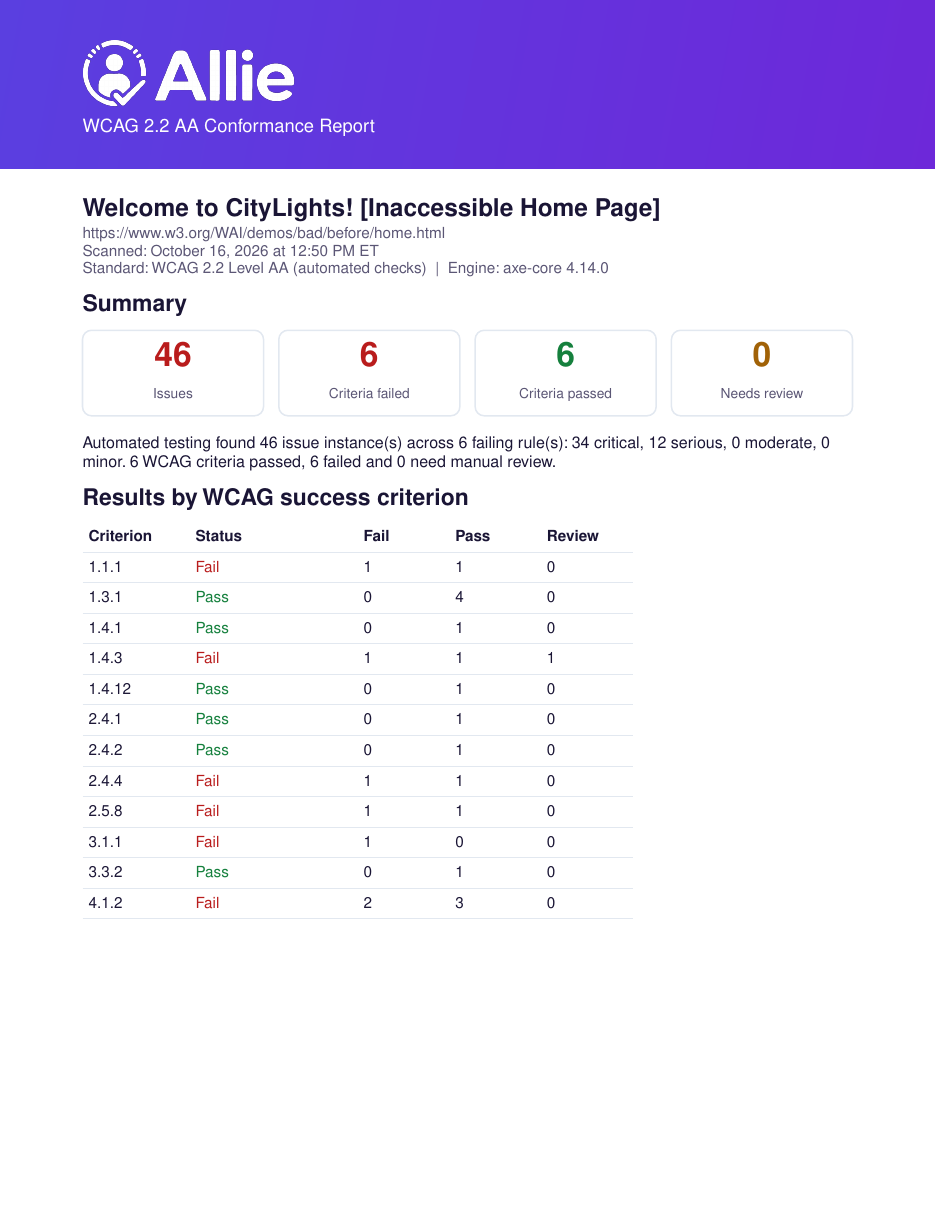
Who it's for
QA leads and developers
Add a fast accessibility check to your release routine, catch regressions on key pages and hand developers an exact list of what to fix.
Small business owners
You do not need to be an expert. Paste your site address, see what a visitor using a screen reader or keyboard might run into, and get plain-language guidance.
Nonprofits and public-minded teams
Keep your donation, event and information pages usable for everyone, and keep dated reports to show your progress over time.
What automated testing can and can't do
Automated tools like axe-core are very good at finding certain problems quickly and consistently, such as missing text alternatives, low colour contrast, unlabeled form fields and invalid ARIA. They cannot judge everything. Automated testing finds only some accessibility issues, and a page with no automated failures can still be hard to use.
Things only a person can check include whether alt text is meaningful, whether the reading and focus order make sense, whether captions are accurate and whether a task can be completed with a keyboard or screen reader. We recommend pairing Allie with manual review.
Allie does not certify conformance with WCAG, the ADA or any other law, and nothing here is legal advice. Read our methodology.
Frequently asked questions
Is Allie free?
Running a preview scan is free: you see the number of issues and how severe they are. The full issue list, HTML fixes and PDF report for one scan cost $5.99, or you can subscribe to a plan with more scans each month. See the pricing page.
Which standard does Allie test against?
WCAG 2.2 Level A and AA, using the open-source axe-core engine. The methodology page lists exactly which rule sets are enabled.
Does Allie test my whole site?
No. Each scan tests one page, in its initial loaded state, as a visitor who is not logged in. Test your most important pages one by one. Multi-page crawling is on the roadmap for Premium and is not available yet.
If I get a clean result, does that mean my site is accessible or protected from legal claims?
No. A clean automated result means axe-core found no failures on that page. It does not prove conformance, and Allie cannot promise protection from complaints or legal claims. Allie is not a law firm and does not give legal advice.
What does Allie do with the URLs I scan?
The page is loaded once in an isolated browser, tested, and the results are saved so you can open the report. Read the details on the security and privacy page.
Can I test a site I do not own?
Allie only loads publicly reachable pages and identifies itself as AllieA11yBot. Please only scan sites you own or are allowed to test.
How do I pay, and do you store my card?
Payments are handled by Stripe. Card details go to Stripe, never to Allie, and we do not store card numbers.
How do I contact you?
Email hello@a11ie.io. See the contact page.
Find out what is on your page today
Run a free preview scan in seconds. No install, no credit card.